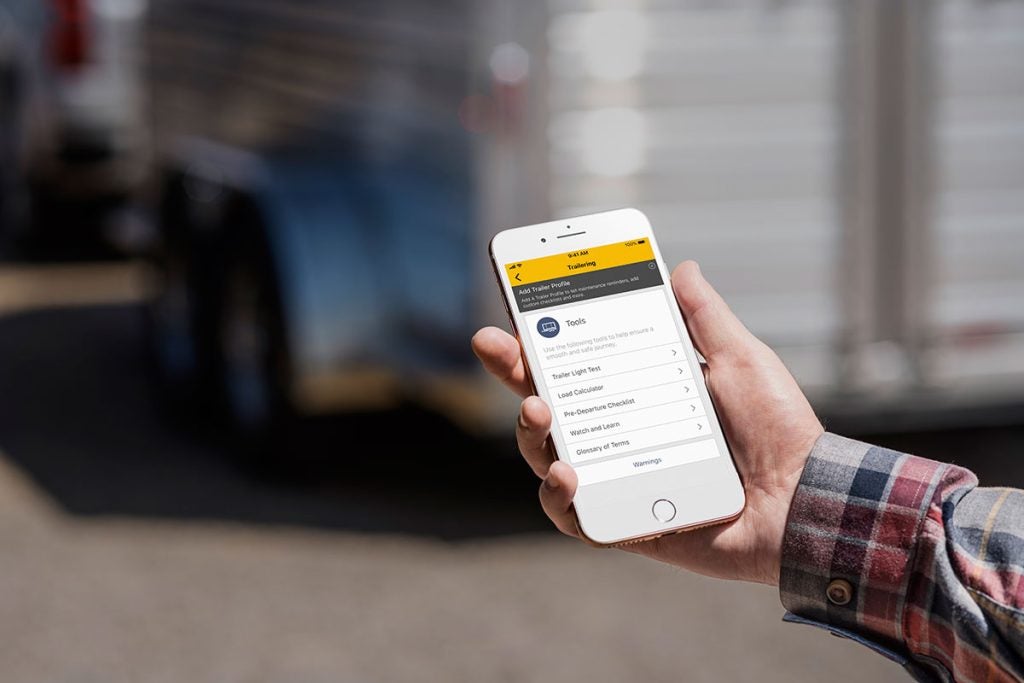



The myChevrolet app made its debut in 2010, enabling users to interact with their Chevy via their smartphone. The technology has continued to improve over the last decade, with additional capabilities providing an even more seamless user experience! more This customizable app pairs with new Chevy models, allowing drivers to access convenient features like remote start, vehicle lock/unlock, and more. It even provides helpful details like tire pressure, fuel life, and more! Read on to be sure you take advantage of all the myChevrolet app has to offer! And then check out our new Chevy selection – in stock and ready to roll at Burns Chevrolet! Getting Started Follow these simple steps to set up the myChevrolet app: Download the app. Visit the Apple App Store (Apple products) or Google Play Store (Android products) and download the app. Or text “myChevrolet” to 56000 to get started. Sign in. When you sign in using an account already registered with OnStar, your vehicle will sync with the app, giving you access to all subscription-based features. Explore the home screen. Check out the available features. Because the app requires a paid plan, features are based on your particular service plan and the way your Chevy model is equipped. Tap the Menu icon (your initials) in the upper-left corner to view your account details. Tap your vehicle’s name (if there’s more than one associated with the account) to navigate to your Garage. That’s where you can change the vehicle you’re viewing or add a new one. Tap the Help Menu icon (three dots) in the upper-right corner for help or to schedule service! Tap and hold one of the Remote Command icons to start a request. Keep holding until the request is complete. If the Remote Command you’re looking for is not displayed, tap View More. Which Features Does the myChevrolet app Include? Always looking to the future, Chevy continues to upgrade the myChevrolet app. It already makes staying in touch with your vehicle simple, so drivers can’t wait to see what else Chevy has in store! Designed to improve the ownership experience, the app offers these popular features: Personalized User Profiles Use the app to program your infotainment preferences, so your Chevy is ready to rock each time you get behind the wheel! Remote Commands Paired with your remote key fob, the myChevrolet mobile app includes a Vehicle Locator so you’ll never roam the parking lot again! Plus, you can remotely start or unlock it, and even take your Alexa or Google Assistant along for the ride! Vehicle Status Monitor key vehicle performance data, like tire pressure, fuel levels, oil life, and more. You can also schedule a service appointment when it’s time for a tune-up – with just a few taps in the app! Owner Resources Utilize the MyRewards feature to earn points that can be used to redeem certain services and accessories. Or use the Chevy Smart Driver feature to get tips for optimizing your vehicle’s performance. Family Sharing is another must-have, allowing you to add up to eight family members. And don’t forget about the WiFi hotspot! Trailering Features Towing a trailer? The Trailer Light Test feature tests your lights to make sure they’re working, while the Trailer Load Calculator determines the combined weight of your Chevy and everything it’s transporting. The myChevrolet app even includes a glossary with need-to-know trailering terminology! The myChevrolet app pairs with electric vehicles too! It helps you keep track of charge status as well as locate charging stations. Just tap the Energy icon to discover EV features! Keep in mind that feature availability depends on your plan. If you’re not sure which features are included with your vehicle, just ask a member of the Burns Chevrolet team! We’re here to help you find the perfect model, so don’t hesitate to get in touch! Cruise Away in a New Chevy From Your Trusted Dealership in Rock Hill! Ready to experience the road ahead like never before? The easy-to-use myChevrolet app provides access to a variety of features – and a ride like none other! To learn more about the app’s capabilities, or to find out which features are available with your plan, get in touch. And be sure to check out our huge new vehicle selection, including popular models like the Chevy Traverse, Malibu, Colorado, Equinox, Silverado, and more! We even have 2023 models on the lot! If you’re looking for a budget-friendly option, we have plenty of pre-owned vehicles to choose from, including certified pre-owned Chevys! Don’t see the model you’re looking for on our lot? Just ask about ordering! As your local Chevrolet dealership in Rock Hill, SC, Burns Chevrolet is proud to serve customers throughout the Carolinas – from Charlotte, NC to Fort Mill, SC. No matter where you visit from, our friendly team will make you feel right at home. So come see us today!